Lab 1: Using Frida
Overview
This lab provides an introduction to dynamic instrumentation using Frida, a popular framework for analyzing desktop and mobile applications. There are a variety of alternative frameworks but many of the basic concepts from Frida generalize to other tools.
Goals:
- Gain a basic understanding of Frida’s features
- Practice quickly debugging a larger application
- Apply previously learned triage techniques to scope your traces
- Practice vulnerability analysis
Estimated Time: 1 Hour 15 Minutes
Part 1: Function Hooking
Install Frida

Follow the instructions on Frida’s website to install, or
use the following command:
uv tool install frida-toolsDownload and run web server
Today’s labs will analyze an unknown web server for functionality and vulnerabilities. Download the web server and run it on your linux virtual machine. Browse to the served content in your web browser. Note how the web server prints corresponding logs.
vuln_axum_server# Add execute permissions
chmod u+x ./vuln_axum_server
# Try running the vulnerable web server
./vuln_axum_serverTriage the binary
Look for symbols in the binary to get a hint about its functionality. The
standard UNIX utility for this is the nm command.
nm ./vuln_axum_serverQuestion
Many symbol names appear convoluted and illegible. Why is this? (HINT: Check out this wikipedia link.)
Using the nm man page or
the nm --help text, see if there’s a way to de-mangle the function names.
Question
Google some of the function names that you see. Does this tell you what language the binary was originally written in?
Question
What are some public packages for the source code language used by to this binary?
Try to find a couple and google them to see what they are used for. The function names should from above will follow this structure:# Run the following nm -g -C ./vuln_axum_server | rg '::' | rg -v '[T|t] <' | less -S # The first item before the `::` is usually the library name # Offset | Symbol Type | Symbol Name 000000000022ee70 T package_name::module::submodule::function
Create your scripts
Frida’s most powerful feature is scripting the injected JavaScript engine to change the state of the running program. We’ll develop a basic program to demonstrate function hooking. Below are two skeletons to get you started. Read and understand each of these scripts before continuing.
The first script is a python script used to attach Frida to the target process
and load the hook_commands.js script into the injected core.
import pathlib
import sys
import time

import frida

SCRIPT_PATH = pathlib.Path(__file__).with_name("hook_commands.js")
TARGET = "vuln_axum_server"


def find_target(device):
    for proc in device.enumerate_processes():
        if proc.name and TARGET in proc.name:
            return proc
    return None


def on_message(message, _data):
    payload = message.get("payload", {})
    if message["type"] == "send":
        msg = payload.get("message", payload)
        tag = payload.get("type", "send")
        print(f"[{tag}] {msg}")
    else:
        print(f"[frida {message.get('type')}] {message}")


def main():
    device = frida.get_local_device()
    target = find_target(device)
    if not target:
        print("vuln_axum_server not running. Start it with `./vuln_axum_server` first.")
        sys.exit(1)

    print(f"Attaching to PID {target.pid} ({target.name})")
    session = device.attach(target.pid)

    script = session.create_script(SCRIPT_PATH.read_text())
    script.on("message", on_message)
    script.load()

    print("Hook loaded. Trigger the /run endpoint to exercise Command::output. Ctrl+C to exit.")
    try:
        while True:
            time.sleep(1)
    except KeyboardInterrupt:
        session.detach()


if __name__ == "__main__":
    main()
The next script runs inside the target process in the Frida js interpreter. It
attempts to hook a symbol name and print to the console on the callback. Using
the information gathered during your triage, try to identify a symbol associated
with running a shell command in the source language standard library. Modify
this script to hook that symbol and figure out which UI elements in the served
web content run shell commands in the background.
"use strict";

// Hook a symbol by name
const SYMBOL_NAME = ""; // TODO: Put your symbol name here

const module = Process.mainModule;
const symbols = module.enumerateSymbols();
const target = symbols.find((sym) => sym.name === SYMBOL_NAME);

if (!target) {
    console.log(`Symbol ${SYMBOL_NAME} not found in ${module.name}`);
} else {
    console.log("Hooking " + SYMBOL_NAME + " @ " + target.address);
    const hook = {
        onEnter(args) {
            console.log(`${SYMBOL_NAME} called`);
        },
    };

    Interceptor.attach(target.address, hook);
}
To run the script you can crate a virtual python environment and install Frida:
# Create the virtual environment
...> uv venv .venv

# Activate it
...> . .venv/bin/activate.fish

# Install Frida
(.venv) ...> uv pip install frida

# Run the python script
uv run frida_script.py
Tip
If you have trouble attaching to the process, it may be due to ptrace restrictions in linux. You can lift some restrictions with the following command.
sudo sysctl kernel.yama.ptrace_scope=0Alternatively, you can also use Frida interactively to spawn the process and load your script:
# Run frida script
frida -f vuln_axum_server -l hook_commands.js
The interactive REPL has tab complete which can help you experiment with what
you want to put in the hook_commands.js script. Try seeing what the
module.enumerateSymbols() function does!
Question
Spend some time experimenting with Frida and try to hook a function that gets called when you interact with the web server athttp://localhost:3000.
Part 2: Function Tracing
Faster tracing with frida-trace
Scripting is Frida’s most powerful feature but for common tasks like tracing
Frida distributes prebuilt utilities that can be used without a custom script.
We’ll experiment with tracing the web server using the frida-trace utility.
Here are some simple examples using the tool:
frida-trace -i 'fstat64' -f $(which ls) /frida-trace -i 'strcasecmp' -f $(which curl) -- -o /dev/null https://hacs408e.netLook at the auto-generated tracing scripts in the __handlers__ directory and
answer the following question:
bat __handlers__/libc.so.6/*Question
Why are the string arguments forstrcasecmpprinted, but the arguments tofstat64are not?
Lets go back to looking at the vuln_axum_server program. Since crate names are
embedded in the mangled symbol names, you can use this to trace specific
functionality. For example, examining the symbols indicates that the reqwest
crate is linked. We can trace related functions by following functions with the
package name in the symbol. Try running the following command.
killall vuln_axum_server
frida-trace -f vuln_axum_server -i "*reqwest*"
This command will attach the tracer to the vuln_axum_server process if it is
running and trace functions matching the expression following -i. Clicking
served web content in your browser during a trace should make it easy to
discover which user interface elements trigger these functions.
Trace shell commands
Craft a new Frida trace handler script to trace symbols related to shell command invocation. To find the right keywords you should look for standard practices for invoking these commands in the target language and how they map to symbols you observed during triage. Use this to verify which UI elements in the served web content trigger shell commands upon interaction.
Identify the command inject
Web severs that trigger shell commands sometimes have command injection vulnerabilities. You’ve already narrowed down the functionality associated with shell commands. Now experiment with in the browser to identify which one is vulnerable.
Part 3: TLS Keys Dump
Disclaimer
We had originally intended for this to cover key extraction using the
vuln_axum_server from the previous sections but, unfortunately we ran into
some issues at the last minute. For now you can just work through the
following example.
In this part you’ll use Frida to dump the TLS keys associated with an encrypted web request.
Dump TLS keys
One alternative tool that’s pretty cool is
friTap which is:
“… a powerful cybersecurity research tool that simplifies SSL/TLS traffic analysis by automating key extraction and traffic decryption.”
It works by using Frida to dynamically intercept SSL/TLS operations used by
the target application:
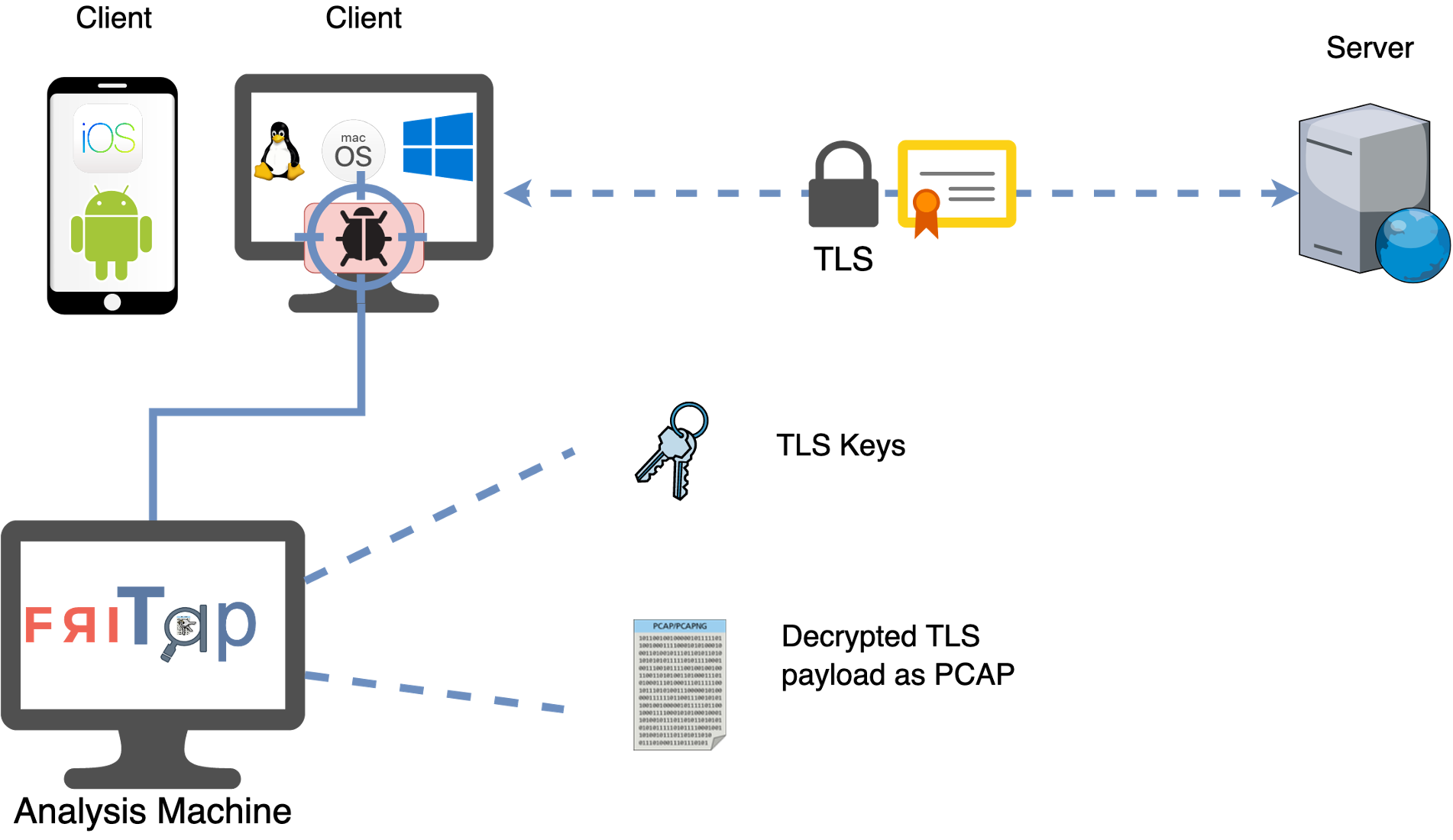
See their documentation for more information.
Here’s an example of using fritap to instrument the curl binary to capture
TLS session keys and use them to decrypt the traffic in Wireshark. You can apply
these instructions to either curl or the server binary.
# Make a temporary directory and navigate to it
mkdir -p /tmp/foo
cd /tmp/foo

# Start wireshark and capture on the ethernet interface
wireshark &>/dev/null &

# Use friTap to spawn the the curl program and save the
fritap -k keys.log  -s "$(which curl) -L https://hacs408e.net"

# You will probably need to use `ctrl+c` to end the friTap command
Tip
Don’t forget to stop the capture in Wireshark!
Check that you captured the request using the basic+dns filter button or the
following:

(http.request or tls.handshake.type eq 1 or (tcp.flags.syn eq 1 and tcp.flags.ack eq 0) or dns) and !(ssdp)
Then review the following links to answer the questions:
Question
What log file allows Wireshark to decrypt HTTPS/TLS packets? Where can you specify this file in the Wireshark settings?
Question
Which secret is used to encrypt data sent to the client? Is this label present in yourkeys.logfile?
Solutions
Click to reveal..
Web Server Command Injection
Still a work in progress. Check back later.
TLS Keys Dump


